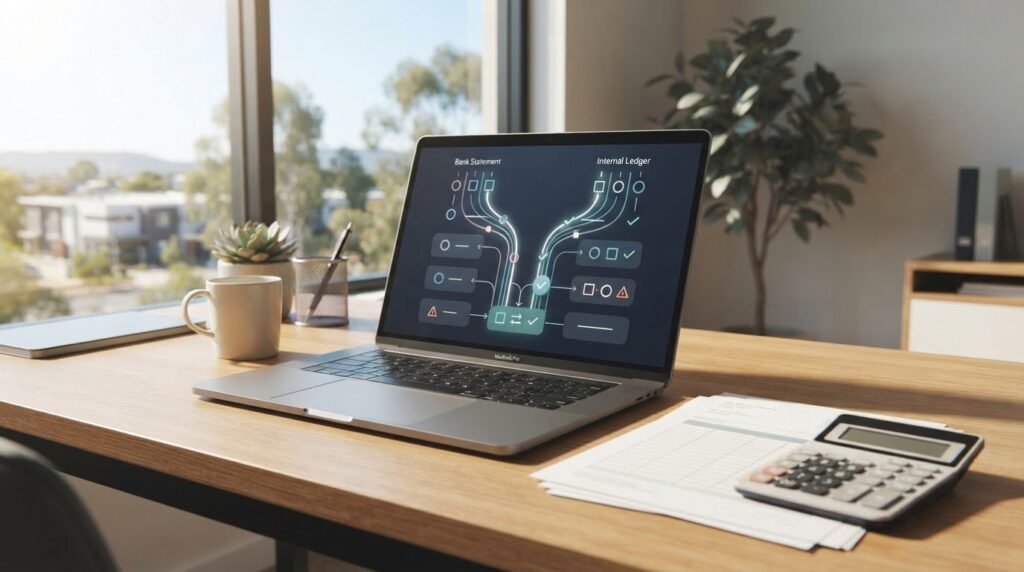

The value of cloud accounting is not simply that your records are online. It is having current financial information to support decisions. Cloud accounting services in Perth can connect bank feeds to your records, provide shared access for you and your accountant, and update your financial picture as transactions are entered. With the right support, those figures can also inform practical business advice.
It makes sense to want less manual work and a clearer view of cash flow, while retaining the support of an accountant who understands your business. Cloud software can organise transactions and reporting, but its value increases when you combine the information with informed guidance.
This article explains how cloud accounting works, from automated bank feeds to shared access and collaboration. It also covers what an accountant and business adviser can contribute, what to consider when choosing a setup, and how these services can support the day-to-day finances of a Perth business.
Key Takeaways
- Use financial dashboards to build a clearer view of revenue, expenses and cash flow, then apply that information to everyday decisions.
- Automated bank feeds can reduce manual transaction entry, while regular review helps keep records organised.
- Shared online access lets you and your accountant work from updated financial records, wherever an internet connection is available.
- Choose accounting software that fits your business workflow and the applications you rely on, rather than selecting by features alone.
- Pair well-maintained records with accountant support to make reporting more useful and inform business and tax planning.
What is Cloud Accounting & How Does it Work?
Cloud accounting software stores business records online, allowing authorised users to access updated information on an internet-connected device. In Australia, an accounting system can bring transaction records, invoicing, reporting and collaboration with your accountant together.
To choose a cloud accounting provider in Perth, start with your workflow, reporting needs and the business applications you want to integrate. When switching, organise your existing records and chart of accounts for migration; most businesses can move across within one to two weeks, depending on data volume and account complexity.
Cloud bookkeeping can display revenue, expenses and cash flow on dashboards. Instead of waiting for a month-end report, you can review recorded transactions during the month and see how new income or spending affects the figures. For example, comparing unpaid invoices with upcoming supplier bills can show why rising sales have not yet improved available cash.
Reports are useful only when the underlying records are current and consistently categorised. Set a routine to review transactions, resolve uncategorised items and compare actual results with your budget. Accounting software can automate parts of invoicing, payroll and reporting. An integrated cloud system can reduce manual processing, simplify tax preparation and make reports more dependable.
Cloud platforms can connect with point-of-sale, e-commerce, business intelligence and debtor-monitoring applications. Choose integrations that suit your operations. A retailer may need sales information from its point-of-sale system to flow into accounting records, while an online seller may prioritise e-commerce transactions.
Cash-flow visibility
Use the dashboard to track money coming in and going out, then examine the transactions behind each total. Review outstanding customer invoices alongside bills due, recurring costs and recent sales. This gives you a clearer basis for timing payments and planning spending. Bank reconciliation compares recorded transactions with bank activity, helping you assess available cash more reliably.
GST and tax reporting
Cloud bookkeeping can help organise records for GST, BAS and Single Touch Payroll reporting. Accounting software can calculate GST and prepare BAS information, but accurate transaction coding remains important. For example, distinguish business purchases from other transactions before relying on a report. In Australia, March monthly BAS must be lodged and paid by 21 April, and super guarantee contributions for quarter 3 are due by 28 April.
Payroll records also matter: ATO STP Phase 2 necessitates a digital payroll solution for Australian businesses. Use the system to keep payroll information organised alongside other financial records. A stable internet connection supports access, while a regular review routine helps you spot missing entries before preparing reports or tax records.
Automated bank feeds and transaction capture
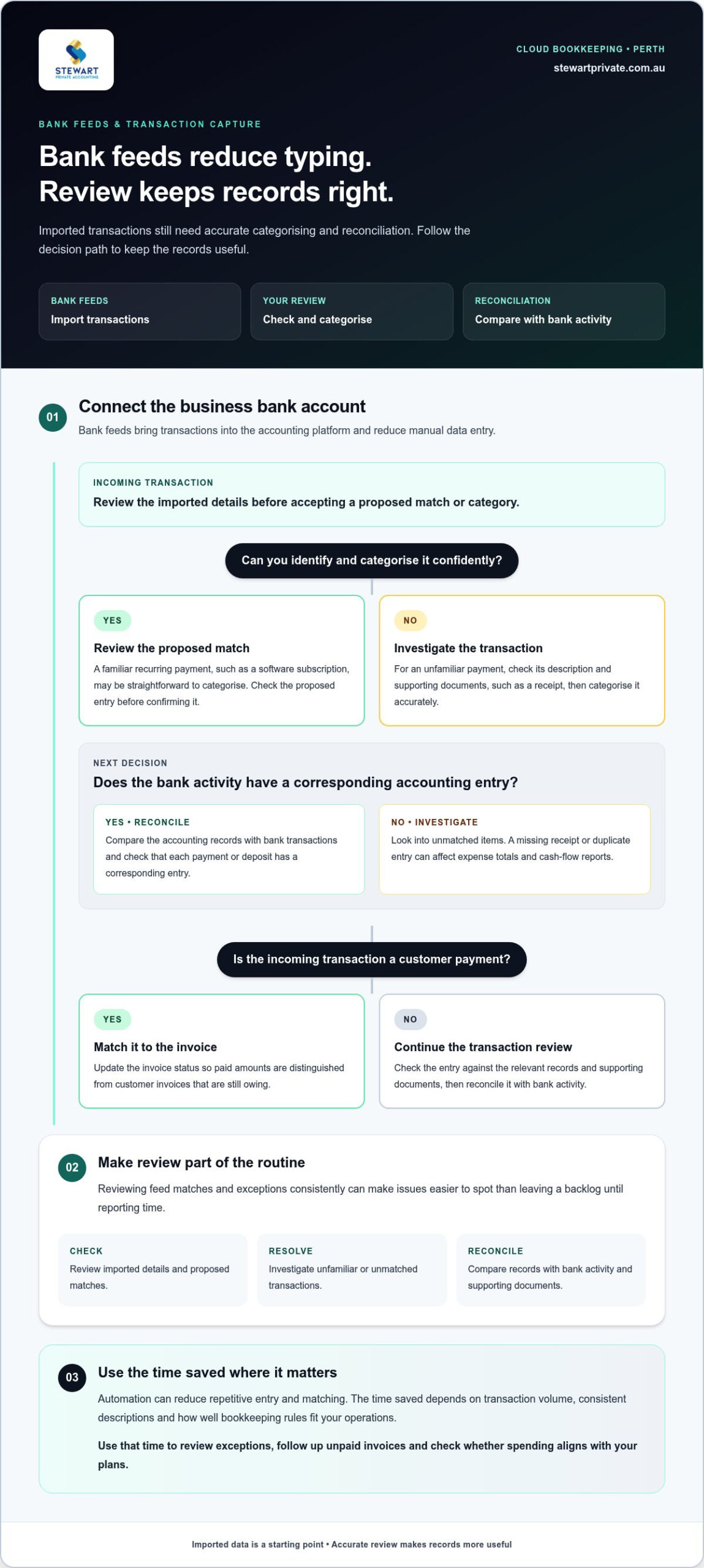
Bank feeds import transactions into accounting platforms and reduce manual data entry. A review process still matters because imported transactions need to be categorised accurately.
Connect the business bank account to the accounting system, then review how new transactions appear. A supplier payment, for example, may arrive with a description that does not identify its expense category. Categorising it correctly keeps reports useful. Imported records also make it easier to compare bank activity with invoices, receipts and other supporting documents.
Automated bookkeeping and data entry
Automation can capture transaction details and reduce repetitive typing, while bookkeeping rules can sort regular income and expenses. Review proposed matches rather than assuming every imported entry is correct. A recurring software subscription may be easy to categorise, but an unfamiliar payment needs attention. Reviewing entries keeps records organised and helps prevent avoidable data-entry and reconciliation errors.
Reconciliation means comparing accounting records with bank transactions. Check that each payment or deposit has a corresponding entry, then investigate anything unmatched. A missing receipt or duplicate entry can affect expense totals and cash-flow reports. Regular checks make exceptions easier to identify than leaving a backlog until reporting time.
Bank feeds can support invoicing workflows, too. When a customer payment appears in the feed, match it to the relevant invoice and update its status. This distinguishes paid invoices from amounts still owing and gives you a more dependable view of incoming cash without manually entering every bank transaction.
Time savings from automation
Automation reduces repetitive tasks such as entering transaction details and matching familiar payments. The time saved depends on transaction volume, consistent descriptions and how well bookkeeping rules fit your operations. Use that time to review exceptions, follow up unpaid invoices and check whether spending aligns with your plans.
Accounting tools can automate administration, including debt follow-up and superannuation payment processes. These functions can help organise tasks, but you still need to review the underlying records. For example, check a flagged overdue invoice before following up so that your communication with the customer is accurate and appropriate.
For better efficiency, review feed matches and exceptions as part of a consistent bookkeeping routine. If transaction capture is taking time away from financial oversight, bookkeeping support can help keep records organised and reconciliations moving.
Cloud bookkeeping can import bank transactions automatically, reducing manual entry and supporting reconciliation. With traditional bookkeeping, records may need to be updated manually, which can take more time and create more opportunities for errors.
Regularly reviewing imported entries helps maintain accurate records and brings exceptions to your attention. This lets you benefit from automation while checking that transactions are categorised and matched appropriately.
Cloud accounting access and real-time collaboration
Cloud bookkeeping lets Australian businesses access and update financial records on an internet-connected device. Shared access supports timely collaboration, while clear permissions ensure each person can work with the information they need.
Remote account access
Cloud accounting can provide access to business numbers 24/7 wherever an internet connection is available. This lets you review a dashboard while away from the office, then discuss current figures with your accountant without relying on a locally stored file. A stable internet connection remains necessary, so plan how your team will handle record updates during outages.
The fee for cloud bookkeeping and accounting depends on the agreed work, including service type, business structure, transaction volume, payroll needs, record quality and complexity. A quote should make the scope clear, including whether bookkeeping, BAS, payroll, tax planning or prior-year work is covered. For Perth small businesses, startups and sole traders, look for an accounting practice that can support the stage and needs of your business.
Mobile access and team collaboration
A mobile device can help you check a financial dashboard while meeting a supplier or reviewing sales away from your desk. Team members can update records online, giving colleagues and accountants access to the same current information instead of separate copies. Agree on who enters transactions, reviews reports and follows up outstanding items.
Shared access works best when responsibilities are clear. A staff member might record a purchase, for example, while a manager checks its category and supporting document. Set appropriate access for each role and keep key records organised. This creates a consistent process, even when staff work from different locations.
Cloud bookkeeping automation
Cloud bookkeeping can connect updated records with routine administration. Accounting tools can automate tasks such as debt follow-up and superannuation payment processes, helping teams manage follow-ups and payments. Review each workflow before relying on it, so the right person can check unusual items and keep records accurate.
Automation can make task status visible to authorised users. A team member, for example, can see whether an invoice has been followed up, while a manager reviews the relevant account information. Set a regular routine to review open tasks, exceptions and record changes. This gives everyone a clearer view of work in progress.
Access settings and team routines determine how useful online collaboration will be. Decide which roles can enter, review or approve records, then document the process for staff. Update access promptly when responsibilities change. Consistent procedures keep shared records orderly and give your accountant a clearer view of current business activity.
Accountant support and business advice
Cloud records give an accountant a shared view of transactions, reports and business activity. Their value increases when someone helps interpret the figures, identify questions and connect financial information with practical decisions.
Perth accountants can support cloud accounting platforms such as Xero, MYOB and QuickBooks Online. These platforms can integrate with bookkeeping tools, but the right setup depends on your workflow, reporting needs and existing business applications.
Accountant support can include reviewing reconciled records, explaining changes in income and expenses, and preparing financial reports. If sales rise but cash remains tight, for example, an accountant can help examine unpaid invoices, supplier bills and regular costs. That discussion can clarify choices about payment timing and spending.
Business advice can help you use reports to plan ahead. Review a profit and loss report alongside cash-flow information, then discuss what the results could mean for hiring, investment or operating costs. A report describes recorded activity; advice helps you assess how that activity relates to your plans.
Payroll is another area where coordinated support can help. Cloud accounting tools can connect payroll information with business records, while an accountant can help you review payroll’s effect on reporting and cash flow. Keep employee details and pay records organised, and raise unusual entries before relying on a report.
Manual tasks may still arise when records are incomplete or a business uses separate systems. An accountant, for example, may need to clarify a transaction entered on a desktop system before it appears correctly in cloud reports. Organised source documents and account descriptions make those discussions more focused, whether you work from a desktop or another device.
Make support practical by setting a regular review routine with clear priorities. Share the reports that matter, note questions about unusual movements and agree which decisions need discussion. A retailer might review seasonal sales and stock-related costs, while a consultant may focus on invoice timing and operating expenses.
An accountant’s input is especially useful when you need help interpreting records, preparing for tax reporting or weighing a business decision. Clear records provide a sound starting point, while a specific question helps turn the discussion into a practical next step.
Cloud-based accounting software lets users access financial data from anywhere and supports real-time updates and collaboration. It can provide a real-time overview of a business’s financial position, including for overseas businesses, giving owners and advisers current information to discuss. Uptake figures offer broader context: 42% of Australian businesses use paid cloud computing to run their business processes, while 38% of European businesses use cloud-based financial software.
Cloud tools are not the only workable approach. For rural businesses in Western Australia with limited or infrequent internet access, traditional bookkeeping may remain practical. It can also suit very small operations with low transaction volumes, such as a solo business or hobby operation. Consider internet access, transaction volume and the value of real-time updates and collaboration. Where access is limited, a traditional method may suit your needs; where cloud access is available, financial information can be accessed and updated collaboratively.
What cloud accounting services are available in Perth, Western Australia?
Perth businesses can combine cloud bookkeeping with accounting, taxation and business advice. These services bring online records together with professional support to organise transactions, prepare financial reports and inform business decisions. The right mix depends on your workflow, the records you need maintained and the advice you want from an accountant.
Cloud accounting platforms include Xero, MYOB and QuickBooks Online. They can integrate with bookkeeping tools, while applications such as point-of-sale and e-commerce systems can feed information into your accounting setup. Before choosing, map how sales, purchases and payments move through your business. An online retailer, for example, may prioritise connecting sales data with accounting records.
Bookkeeping support can help maintain transaction records, process invoices and reconcile bank activity. Clarify which routine tasks are included and how information will be shared. A café may need regular recording of sales and supplier costs, while a consultant may focus on invoices and client payments. Clear responsibilities help you know which records your team must maintain.
Accounting and taxation support can use cloud records to prepare reports and organise information for tax work. Cloud accounting software can include features for calculating GST and preparing and lodging BAS in Australia. Accurate categories and supporting documents remain essential because reports depend on the information entered into the system.
Business advice adds context to reports. Use current figures to discuss cash flow, operating costs or planned investment, rather than treating bookkeeping as an isolated task. A business considering new equipment, for example, can review its recent financial position and discuss how the purchase fits its plans.
To compare service arrangements, list the outcomes you need, such as reconciled records, tax reporting or regular business discussions. Match each outcome to a defined process. Check how the accounting platform will connect with existing applications, who will enter and review information, and how your accountant will use shared records. These details help create a workable setup.
Cloud accounting services in Perth can support different business workflows, but the software should suit how you operate. A small retailer using point-of-sale software may need different integrations from a sole trader managing invoices. Consider transaction types, reporting needs and your team’s capacity to maintain consistent records before choosing a system.
If you want help organising records and connecting accounting support with your business needs, discuss cloud accounting support as a practical next step.
Stewart Private Accounting: Accounting & Taxation Services
Stewart Private Accounting can help with consistent cloud bookkeeping, tax support and business advice. Its Accounting & Taxation Services and Bookkeeping Services help keep financial records organised, while Business Advisory Services can help you understand what the figures mean for your next decisions.
Turn to the practice when you need help maintaining records, preparing for tax obligations or planning ahead. Expert Tax Planning can help you consider tax in the context of broader business decisions, rather than treating it as a year-end task. The right support connects routine financial administration with a clearer view of your business.
Contact Stewart Private Accounting to discuss the accounting support that suits your business.
Make your next accounting decision with clarity
The next step is to decide how better financial information can support your business, not simply which software to use. For businesses considering cloud accounting services in Perth, that means connecting day-to-day records with the accounting and advice needed to plan with confidence.
Stewart Private Accounting brings together Accounting & Taxation Services, Bookkeeping Services and Business Advisory Services. This support can help you manage financial responsibilities and use your records as a basis for considered business decisions. Start with a specific priority, such as improving record-keeping or getting more useful guidance from your accounts, then discuss how the right support can meet your needs.
Start a conversation with Stewart Private Accounting about the accounting support that could work for your business. A clear next step can make managing your finances feel more considered and purposeful.
Frequently Asked Questions
What services are included in cloud accounting packages in Perth, such as BAS, payroll, and tax returns?
Cloud accounting engagements can combine bookkeeping, payroll, BAS preparation and lodgement, taxation support and business advice, depending on the agreed scope. Bookkeeping may cover bank reconciliations and payroll processing, for example, while a company tax return is covered only if expressly included in the agreed engagement. Before work begins, clarify which records, reporting tasks and lodgements are included, and whether catch-up work or additional advice needs a separate scope.
Are Perth cloud accounting services secure, and how is financial data stored and protected?
Cloud accounting records are stored online, and cloud bookkeeping data can be securely backed up with high-level encryption. Protect access by giving each team member their own appropriate permissions and removing access when their role changes. Keep devices secured and use the agreed method for sharing financial documents. Do not include passwords or tax file numbers in an enquiry; use the agreed secure transfer method for client records.
Can a Perth cloud accountant help with ATO compliance, business tax planning, and lodgement deadlines?
Yes, accounting and bookkeeping support can help organise records for ATO reporting, BAS and payroll, while tax planning can help you consider business decisions ahead of year-end. Planning before 30 June gives you time to review trading results and upcoming transactions. For example, discuss a planned asset purchase or change to your business structure early, so its tax implications can be considered alongside cash flow and reporting needs.